If you use CRMLS Matrix, you can give your photographer permission to upload listing photos directly to a specific MLS listing.
This saves you from downloading the MLS files and uploading them yourself. Once access is added, I can handle the photo upload for that property on your behalf.
How Do I Give My Photographer Access to My CRMLS Listing?
When CRMLS asks for the Photographer MLS ID, enter: PHCHADJ
Once PHCHADJ is added to the Photographer MLS ID field for your listing, I will have photographer access to that specific listing so I can upload your finished photos for you.
To add me to your listing:
- Open the listing in CRMLS Matrix.
- Go to the Office/MLS tab of the listing input form.
- Find the Photographer MLS ID field.
- Enter my Photographer MLS ID: PHCHADJ
- Save your changes.
Once my Photographer MLS ID is assigned to the listing, CRMLS gives me access to that specific listing so I can upload the listing photographs for you.
Your other listings are not shared with me. According to CRMLS, the photographer receives access only to the listing where their Photographer MLS ID has been entered.
When Should You Add Me?
The easiest time is after you create the MLS listing and before your photos are ready.
Send me the MLS number once the listing has been created. If you have added my Photographer MLS ID, I can take care of uploading the photography after your images are finished.
This is especially helpful when you are trying to get a listing live quickly and do not want another upload task sitting on your list.
Where Is the Photographer MLS ID Field?
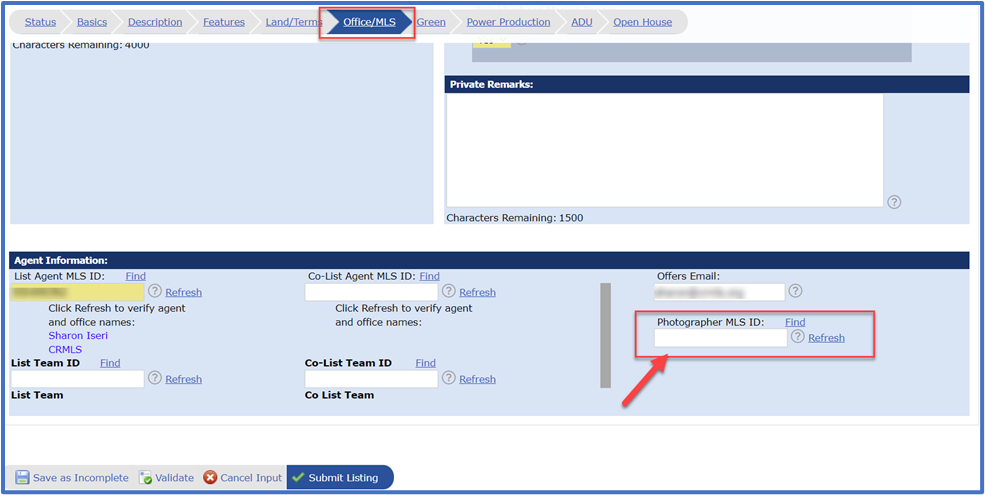
CRMLS places the Photographer MLS ID field under the Office/MLS tab of the Matrix listing input form.
If you do not see the field or have trouble assigning a photographer, CRMLS Customer Care is available at (800) 925-1525.
Does Adding a Photographer Give Them Access to All My Listings?
No.
CRMLS states that adding a Photographer MLS ID gives the photographer access to that listing only. It does not give the photographer access to your other listings.
Do I Have to Let You Upload My Photos?
No. This is optional.
You will still receive your MLS-ready images and can upload them yourself whenever you prefer.
I offer MLS upload assistance because sometimes taking one more task off your plate is helpful, especially when you are coordinating sellers, disclosures, marketing, showings, and a listing launch at the same time.
Need Help?
If you are working on a listing with me and are unsure where to enter my Photographer MLS ID, send me a text or give me a call.
Once access is set up, I can handle the photography upload so you can keep the rest of the listing moving.
Official CRMLS Instructions
CRMLS maintains its own instructions for assigning a photographer to a Matrix listing.